Create an incident
Inform your client base of any downtime or unavailability of your services by creating an incident on your status page.
- Click Incidents from the left sidebar.
- Click Create incident.
- Enter the name of the incident.
- Select an incident status.
- Enter a message to include in the incident update.
- Select the affected monitors by this incident.
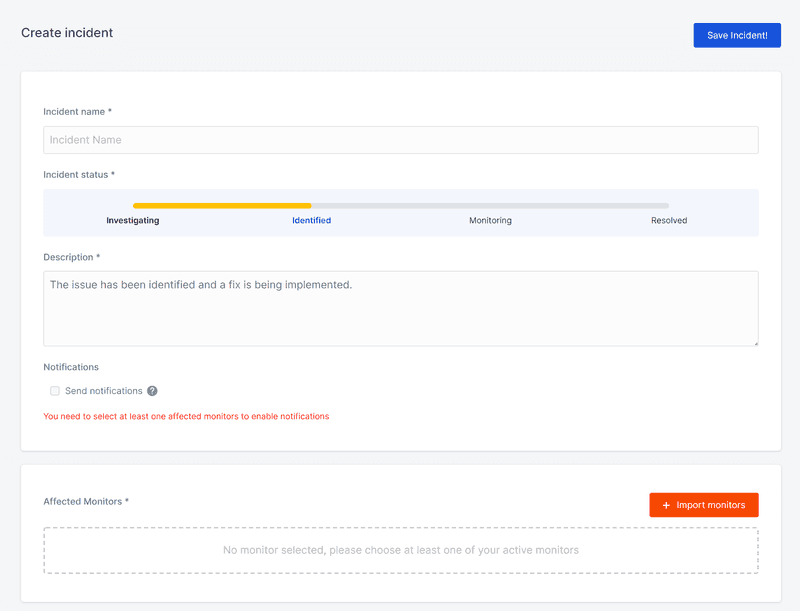
- Select the status pages that should display incident details.

- Select whether or not to send notifications to your subscribers for this incident.
- Click Save Incident.
More information on the fields in the incident form:
Primary Fields
Name
An incident is identified by a name that represents the issue as a whole. "DB connectivity issues," "API timeouts," and "DNS issues" are examples.
Incident status
There are four different statuses for incidents. A state will be specified when you create or update an incident.
-
Investigating - when you observe the symptoms of an issue, you are unaware of the underlying cause.
-
Identified - you've figured out what caused the event and are working on a solution.
-
Monitoring - you think you've solved the problem and are waiting for the symptoms to go away.
-
Resolved - the fundamental cause of the problem has been identified, and your systems are now operating at full capacity.
Message
When you create or update an incident, you may provide a brief note that describes the current situation.
Affected monitors
By specifying which monitors are affected by an incident, and setting their status (operational, degraded performance, partial outage, major outage or under maintenance), your status page and incident updates stay in sync and your users have a complete view of service health.
Secondary fields
Selected status pages
All status pages that you select in this step will display incident messages
Send notifications
Choose whether to notify your status page subscribers about this incident. To send notifications, you need to select at least one affected monitor.